Byobu Session Name in Terminal Window Title
I started using multiple byobu windows to organize my projects, but in the process, something annoying happened: I began to lose track of which window was which. When switching windows, I couldn’t tell from the window title which byobu window to switch to.
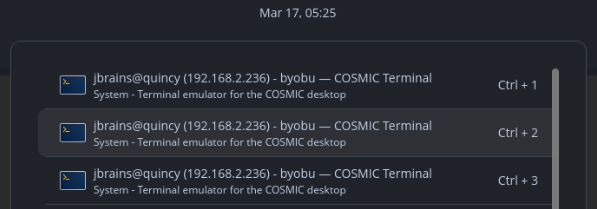
“Uhh… which one?”
Fortunately, I use tmux as the terminal back-end for byobu, so I some very elementary tmux configuration was enable to solve the problem.
Turn Titles On in tmux
In a tmux window:
Press
F12.Type
:set -g set-titles on.Type
:set -g set-titles-string "#{session_name} @ #{host_short}:#{pane_current_path}".
When you reopen the terminal window, you’ll see that the byobu session name is now at the beginning of the terminal window title, making it easier to see when switching windows.
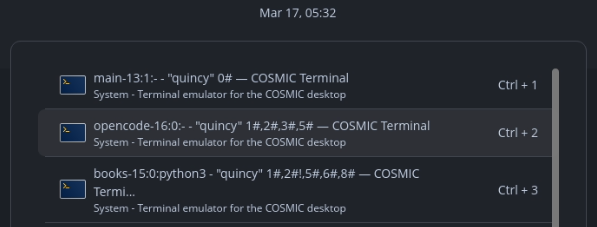
“A little busy, but good enough for now.”
Remember These Settings Forever
Edit the .tmux.conf configuration file. I found mine at $HOME/.config/byobu/.tmux.conf. Add these lines:
set -g set-titles on
set -g set-titles-string "#{session_name} @ #{host_short}:#{pane_current_path}"
When you reopen the terminal window, you’ll see that these settings have become yours to keep forever.
Further Reading
Nothing beats the man page.